
In Ghostty's configuration, bind a key to toggle_quick_terminal when on GNOME and nothing happens. Not a window in the wrong place, not a missing slide: nothing, plus one line in the log. This post is about the extension that makes the key work, and the three ideas I threw out on the way.
Problem
Why an extension at all
Ghostty's quick terminal on Linux is built on gtk4-layer-shell, which speaks the wlr-layer-shell protocol: a client asks to be anchored to an edge, this tall, above everything, and the compositor obliges. Mutter does not speak it, and the GNOME maintainers have declined it more than once (gnome-shell#1141, mutter#973). Ghostty's keybind reference says it plainly: "only GNOME users would not be able to use this feature". Ghostty checks for layer-shell support before it creates the window, and when the check fails the action logs a warning and returns.
An extension cannot teach Mutter a protocol. It can do the protocol's job, though. Deciding where a window goes and keeping it on top of every workspace are compositor powers on Wayland, and extensions run inside the compositor.
Options
What I threw out
The obvious route is ghostty --class=something plus one of the existing quake-style extensions. I ran a small one of my own for a few days. It finds its window by matching the class or the title, so a second Ghostty with the same class is a coin toss, and if the drop-down shares the daemon's class every ghostty +new-window lands in the same bucket. The race between launching and the window appearing is papered over with a timeout. I wanted the extension to know which window is its own, and I wanted Ghostty's config to drive it, not a copy of it.
Ghostty's wasm build inside the shell. GJS exposes WebAssembly and Ghostty has a wasm target, so this looked like the native answer. src/main_wasm.zig ends it: the build exports the terminal state machine, config parsing and font shaping, but the font path rasterises through a browser canvas, the application-level exports are commented out, and there is no pty. Supplying a DOM shim, a Clutter renderer, pty handling and input encoding inside the process that owns your session is not a terminal extension. It is a second terminal emulator with a blast radius.
A companion app embedding libghostty, ddterm-style. The right shape, and not available. include/ghostty.h knows two platforms, macOS and iOS. There is no GTK, Wayland or OpenGL platform to hand a surface to. Upstream is shipping libghostty as a series of libraries, VT first; a GTK terminal widget is last on that list, and Fedora's package carries only libghostty-vt. When the widget lands, this option gets a fresh look.
A companion app with VTE, exactly like ddterm. Works today. The terminal is not Ghostty, so fonts, themes, shell integration and keybinds live somewhere else. That is the one thing I refused to give up.
A dedicated Ghostty process, owned by the shell. ddterm's real trick is not the widget. The shell spawns the app through Mutter's own client API, so Mutter knows which windows belong to it and the extension never guesses. Ghostty can be launched the same way, with a private application id and single-instance mode off so it stays out of the daemon you already run. It is still window management, but the process is owned rather than guessed at, and the first window it maps is the terminal. The shell does the layer shell's work. Ghostty does the terminal's, with your config untouched.
Mechanism
How it works
The launch arguments are the whole integration surface. --class gives the window an application id the extension can call its own. --gtk-single-instance=false keeps it out of your daemon. The third is --config-file pointing at a four-line file the extension ships: no decorations, no title bar, no saved window state, and quit after the last window closes, so exit ends the process and the next toggle starts a fresh one. Those four travel in a file rather than as flags because of a documented Ghostty subtlety: config-file imports load after everything else, flags included, so a quit-after-last-window-closed = false in one of your own drop-ins would silently beat a flag. My daemon drop-in says exactly that, which is how I found out. Everything else comes from the same config files as every other Ghostty window.
Placement is a rectangle from the monitor's work area, a position and a size fraction. Wayland clients own their size, so the extension asks once with move_resize_frame, then listens for size and position changes and re-asks until the frame matches or ten attempts have passed, then stops listening. Nothing polls.
Hiding minimises the window, and that is where Mutter pushed back. A window hidden from the window list cannot be minimised: meta_window_recalc_features clears has_minimize_func for skip-taskbar windows so a user cannot lose a window they have no way to find again. Fair rule. The extension lifts it for exactly one call:
window.show_in_window_list();
window.minimize();
window.hide_from_window_list();
Unminimise is not gated, so showing is unminimise, activate, and a slide on the window actor's translation with the shell's own effect skipped. Minimised plus hidden from the window list keeps it out of the overview and the switcher. If the terminal is visible but unfocused, the toggle focuses it; the next press hides it. The binding works in the overview and showing the terminal closes it. Open a second window inside the process, Ctrl+Shift+N say, and the shell leaves it alone as an ordinary window, chromeless because it inherits the launch flags; when the terminal closes, the extension adopts the next window the process still owns.
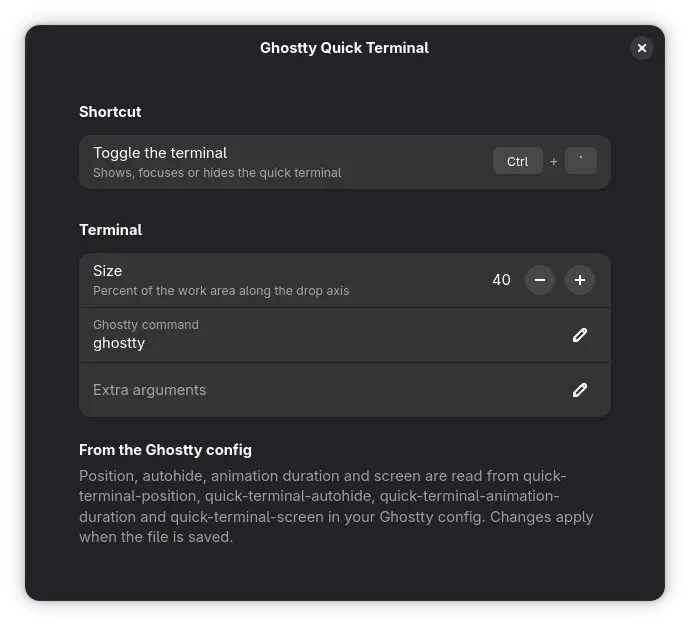
The quick-terminal settings come from Ghostty, not from a second copy in GSettings. At enable, and whenever the config directory changes, the extension runs ghostty +show-config and reads quick-terminal-position, quick-terminal-autohide, quick-terminal-animation-duration and quick-terminal-screen. screen = mouse means the monitor under the pointer; anything else means the primary. quick-terminal-space-behavior is ignored because the window is always sticky. The extension's own settings hold only what Ghostty does not define: the shortcut, the size along the drop axis, the command and any extra arguments.
Ghostty is a child of gnome-shell, in the shell's systemd service cgroup. The environment is the same systemd user environment an app-grid launch gets, so nothing is missing there, but a shell crash or service restart takes the terminal with it and its output lands in the shell's journal. The command and arguments come from GSettings and go to an argv array, never through a shell; still, anything that can write your settings can choose what gets spawned. Disabling the extension ends the terminal, except on screen lock, where the shell disables extensions: the client is parked and adopted again on unlock so a running job survives. A missing or broken Ghostty is one warning in the log, not an exception in the shell.
Setup
Configuration
Ghostty reads one file plus whatever it imports. The quick terminal gets its own drop-in so the same file works unchanged on a layer-shell compositor.
font-family = JetBrainsMono Nerd Font
theme = catppuccin-mocha

config-file = ?config.d/quick-terminal
config-file = ?config.d/localquick-terminal-position = bottom
quick-terminal-autohide = true
quick-terminal-animation-duration = 0.15
quick-terminal-screen = mouseSave the file and the terminal moves. There is nothing to run.
The shortcut lives in the extension, because toggle_quick_terminal is the dead action from the first section and a binding on Ghostty's side has nothing to reach. The default is Control and grave.
Scripts can toggle it over D-Bus. The integration test uses the same call to drive the extension inside a headless GNOME Shell with no display attached:
Loose ends
What it does not do
- Autohide reacts to focus moving to another window.
wl-copyandwl-pasteborrow focus for an instant through a surface titledwl-clipboard, so the extension checks the process behind that title before hiding, and hands the surface focus when the terminal is above so the tool does not hang. Any other short-lived surface still counts as leaving. - Ghostty 1.3 has no
quick-terminal-sizekey, so size is the one thing you still set on the extension side. - Untested against a focused fullscreen window, which Mutter may stack above the terminal.
- If the geometry fixup gives up after ten attempts the window sits wherever Ghostty last put it, and the next toggle tries again.
- ddterm moves its child into its own systemd scope, which keeps it out of the shell's cgroup and gives it a journal identity of its own. This one stays in the shell's; the crash outcome is the same either way.
- Not on extensions.gnome.org yet. The reviewer there gets to decide whether keeping a process alive across a screen lock counts as cleaning up. I think it does.