

The model list in my OpenCode config was stale the day I wrote it. Every quant I pulled onto the Lemonade server meant editing opencode.jsonc again, and the editor had no way to know the context window, the vision flags, or the download state from a model id. The list was a file that only gets worse.
The catalog should come from the server, not from a file I maintain.
Version 1.0.0 and later use the OpenCode v2 plugin API and do not run on OpenCode 1.x. On OpenCode 2.x, install with opencode plugin add opencode-lemonade; the config examples below use the v2 plugins key with object entries. On OpenCode 1.x, pin the last v1 release:
{
  "plugin": ["opencode-lemonade@0.3.0"]
}
The discovery behavior and every filtering option are unchanged. See the v1 to v2 migration guide for the provider settings and per-model override changes.
What it does
The server already knows what it can run
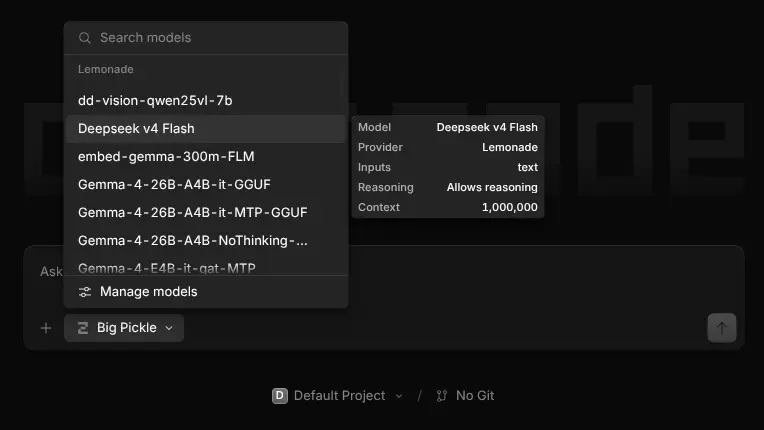
opencode-lemonade is a plugin that asks the Lemonade server once, at OpenCode startup, and registers the models it can run today as the lemonade provider. Install it and the picker fills itself.
opencode plugin add opencode-lemonadeIf you prefer editing the configuration file yoursef, you can do so as shown here.
{
  "$schema": "https://opencode.ai/config.json",
  "plugins": ["opencode-lemonade"]
}
That is the whole setup. No provider block, no npm package to name for the provider, no maxTokens guesses.
The fields that matter
Context, output, vision, capabilities
A plain /v1/models response does not carry the fields that decide whether a model is usable. The Lemonade catalog does, and the plugin reads them straight into the provider:
| Catalog field | Becomes | Why it matters |
|---|---|---|
ctx_size / context_length | model context limit | long-context models get their length, small ones do not get prompts that OOM |
| output cap | model output limit | capped at the server's real value, with a default_output_limit fallback |
vision / vlm labels | image attachments + input modalities | a model that can see (say, Qwen 2.5 VL) shows up as one that can |
tool-calling / reasoning labels | OpenCode capabilities | tool use and thinking modes only where the model supports them |
Every field in that table traces back to the catalog entry for the model that will run the prompt.
A picker you can trust
Downloaded and ready, or filtered out
By default the plugin registers only local models whose weights are on disk. An undownloaded checkpoint stays out of the picker, so the editor never offers a model that is going to sit and download on first use. Cloud backends are a separate axis, included by default and gated by cloud_models (include, exclude, or only). Set downloaded_only: false and the plugin pulls the full catalog with show_all=true when you want to browse everything the server knows about.
When you do want to shape the list, the filtering happens before OpenCode sees a model: include and exclude take globs or regexes on model ids, and exclude_labels matches catalog labels.
Configuration
The common case needs no configuration
Host and API key default to the LEMONADE_HOST and LEMONADE_API_KEY environment variables. When you need options, they stay plugin options:
{
  "plugins": [
    {
      "package": "opencode-lemonade",
      "options": {
        "host": "{env:LEMONADE_HOST}",
        "apiKey": "{env:LEMONADE_API_KEY}",
        "exclude": ["*embedding*", "*whisper*", "*:batch"],
        "default_output_limit": 8192,
        "max_context_limit": 128000
      }
    }
  ]
}
{env:...} and {file:...} templates resolve at load, so keys never sit in the config file. A servers option registers more than one Lemonade server, each as its own provider, which is how a work server and a local one coexist.
OpenCode auto-polls a small hardcoded set of providers and treats everything else as a file you maintain. A plugin is the extension point that gets to ask the server at startup, which is why the catalog, the context windows, and the vision flags stay true without manual bookkeeping.
Try it
Pull a quant, restart, pick it
Add the plugin line above and restart OpenCode. The lemonade provider appears in the picker with the models your server actually has, their real context windows, and their real capabilities. Download a new quant, restart, and it is there, with no config diff and no documentation look-up.
Prefer to skip the package registry? Grab lemonade-discovery.js from the GitHub release and drop it in ~/.config/opencode/plugins/, which OpenCode loads on startup.
Lemonade not running? OpenCode starts normally and the lemonade provider simply comes up empty until the server is reachable again.
If you only want to expose a specific subset managed by you on Lemonade, you could consider adding the label opencode to these models and then configuring the plugin to filter only those models that have this label, for example "include_labels": ["opencode"].